Configuring System and Network Settings
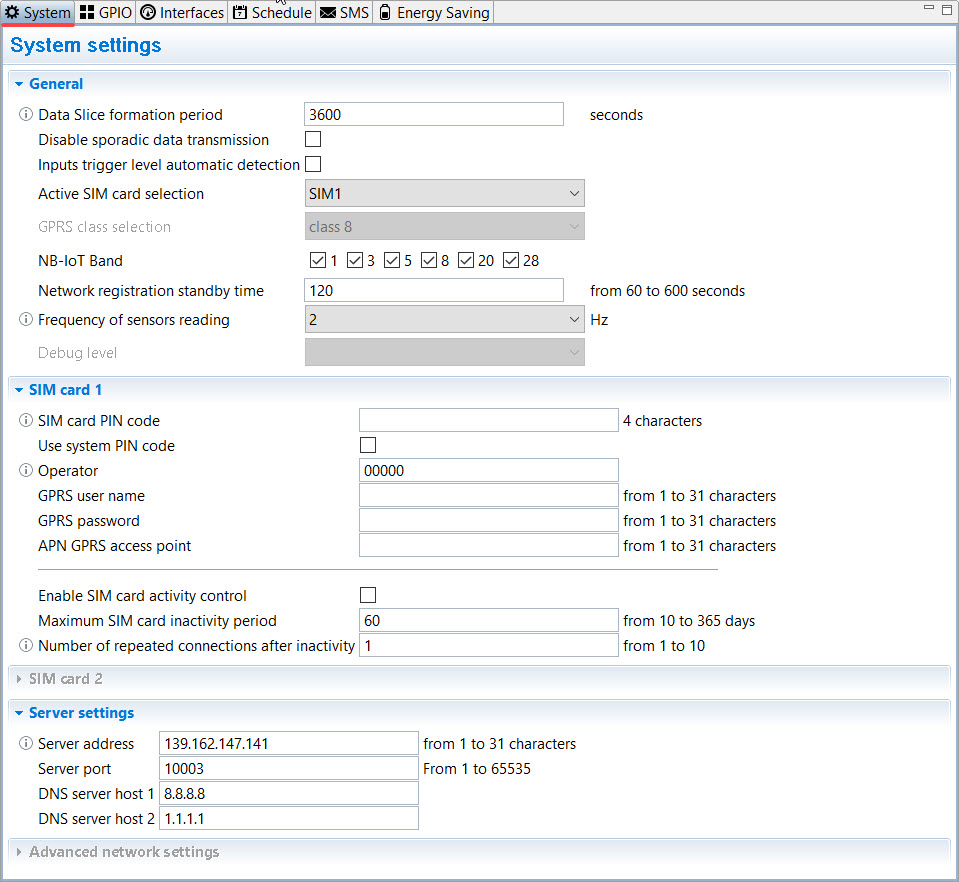
System settings appears to be a tab designed to ensure data transmission parameters configuration. Default values and range of values for each parameter are indicated in table below.
| Parameter | Description | Default value | Value options | |
|---|---|---|---|---|
| Data slice formation period | Data Slices periodicity registration in the log | 3600 sec (once an hour) | 60 – 86400 sec | |
| Disable sporadic data transmission | Disables data transmission initiated by the Data Logger. The data archive is transmitted only on request from the server |
Sporadic data transmission enabled | Enabled/ Disabled |
|
| Input trigger level automatic detection | Automatic detection of input response states by resistance: 1 - 15 kOhM – 4 states (NAMUR circuit) Short circuit/break – 2 states |
Enabled | Enabled/ Disabled |
|
| Active SIM card selection | Setting up SIM cards operating mode | Auto (see 1.13, SIM cards operation) |
SIM1/SIM2/Auto | |
| GPRS class selection | GPRS class selection: class8, class10 or Auto (class8/10/12) |
class 8 | class 8/class 10/Auto | |
| NB-IoT band |
Selecting frequency bands for NB-IoT network for NB-IoT data loggers only |
all bands selected |
1/3/5/8/20/28 |
|
| Network registration standby time | Maximum time to register in a network using both SIM cards (in case both cards are installed). If communication session fails, the next attempt to register in the network will occur after 1 hour, then after 2, 4, 8, 24 hours, and then every 24 hours. |
120 seconds (if both cards are installed, 60 sec for each) |
60 – 600 sec | |
| Frequency of sensors reading | Setting inputs polling frequency |
2Hz |
2Hz, 20Hz, 100Hz |
|
|
Debug level |
When "AT-commands " mode is selected, "Debug Console" window shows a log of AT-commands displaying device status. |
Disabled | Disabled/AT commands | |
| SIM1/SIM2 | ||||
| SIM card PIN code | Required to enter, if a SIM card is used with the PIN code enabled. If the system PIN is enabled, the parameter is not filled in! |
Not set | 4 characters | |
| Use system PIN code | System PIN automatic generation to prevent SIM card use in other devices | Disabled | Enabled/ Disabled |
|
| Operator |
Public Land Mobile Network (PLMN). Specified by the network operator for NB-IoT data loggers only |
00000 | 5-digit code | |
| GPRS user name | Specified by the network operator | SIM1: Not set SIM2: Not set |
1 – 31 characters | |
|
GPRS password |
Specified by the network operator |
SIM1: Not set |
1 – 31 characters |
|
|
APN GPRS |
Specified by the network operator |
SIM1: Not set |
1 – 31 characters |
|
|
Enable SIM card activity control |
The option works only, if in the Active SIM card selection parameter Auto is set. Enabling the option to monitor modem activity on SIM cards. On an inactive SIM, a periodic connection to the server will be initiated in order to prevent SIM card disconnecting for non-use. DTU will establish the connection from this card after the end of the period specified in the Maximum SIM card inactivity period line. If the device does not establish the connection after the end of the period specified in the Maximum SIM card inactivity period, the event "The period of no connection on SIMX exceeded" will be generated, and then device will repeat connection attempts in accordance with the parameter Number of repeated connections after inactivity |
Disabled |
Enable |
|
|
Maximum SIM card inactivity period |
Number of days, when the data logger is allowed not to perform the SIM card activity control. |
60 |
10 – 365 days |
|
|
Number of repeated connections after inactivity |
Number of attempts to check the activity of an inactive SIM card after the maximum period of inactivity has expired |
1 |
1 - 10 |
|
|
Server address |
IP address or server domain name, where the DTU is connecting to transmit data. |
iot24.eu cloud software IP: |
1 – 31 characters |
|
|
Server port |
TCP (GSM) or UDP (NB-IoT) server port number |
iot24.eu cloud software port: |
1 – 31 characters | |
ATTENTION!
Each time you change the parameters, do not forget to click the Save settings button 
Unsaved changes will be highlighted in yellow.